
Download Microsoft Image Resizer PowerToy – image resize, resize image, resize photos, image sizing tool, Windows XP, right-click resize, photo resizing, image processing, digital image tool, resize tool, image utility, image management, image editing, image optimization, image tool
Overview
Microsoft Image Resizer PowerToy is a lightweight utility designed to simplify the task of resizing digital images on Windows XP systems. As a productivity-focused tool, it addresses the common challenge of adjusting image dimensions for web sharing, email attachments, or archival purposes without relying on complex image editing software. The app is particularly useful for users who frequently handle photo batches and require a fast, no-frills solution.
Its core purpose is to integrate seamlessly into the Windows Explorer environment, enabling users to resize images through a simple right-click context menu. This eliminates the need to launch dedicated image editors, streamlining workflows for both casual users and professionals managing large volumes of digital content. The tool is ideal for individuals seeking efficient image optimization without technical overhead.
Although the developer did not provide additional technical details, Microsoft’s reputation ensures reliability and compatibility within the Windows ecosystem. Real-world use cases include preparing images for online forums, compressing files for email, or standardizing dimensions for digital portfolios. In the broader context of productivity tools, Microsoft Image Resizer PowerToy fills a niche by offering a minimal yet effective solution for image scaling, proving that powerful functionality doesn’t require a heavy interface or steep learning curve.
Key Features & Functionality
- Right-Click Integration: The tool leverages Windows Explorer’s context menu, allowing users to access resizing functions instantly by right-clicking on one or more selected images. This eliminates the need to switch between applications and significantly reduces workflow interruptions.
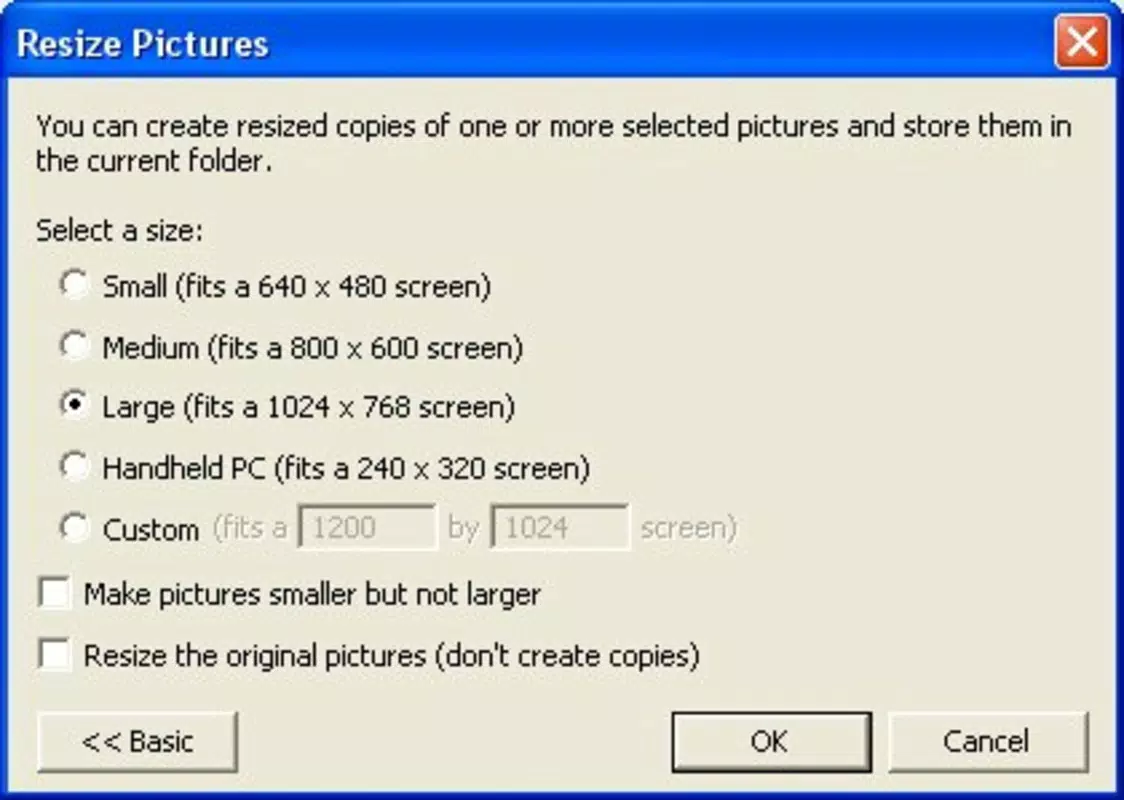
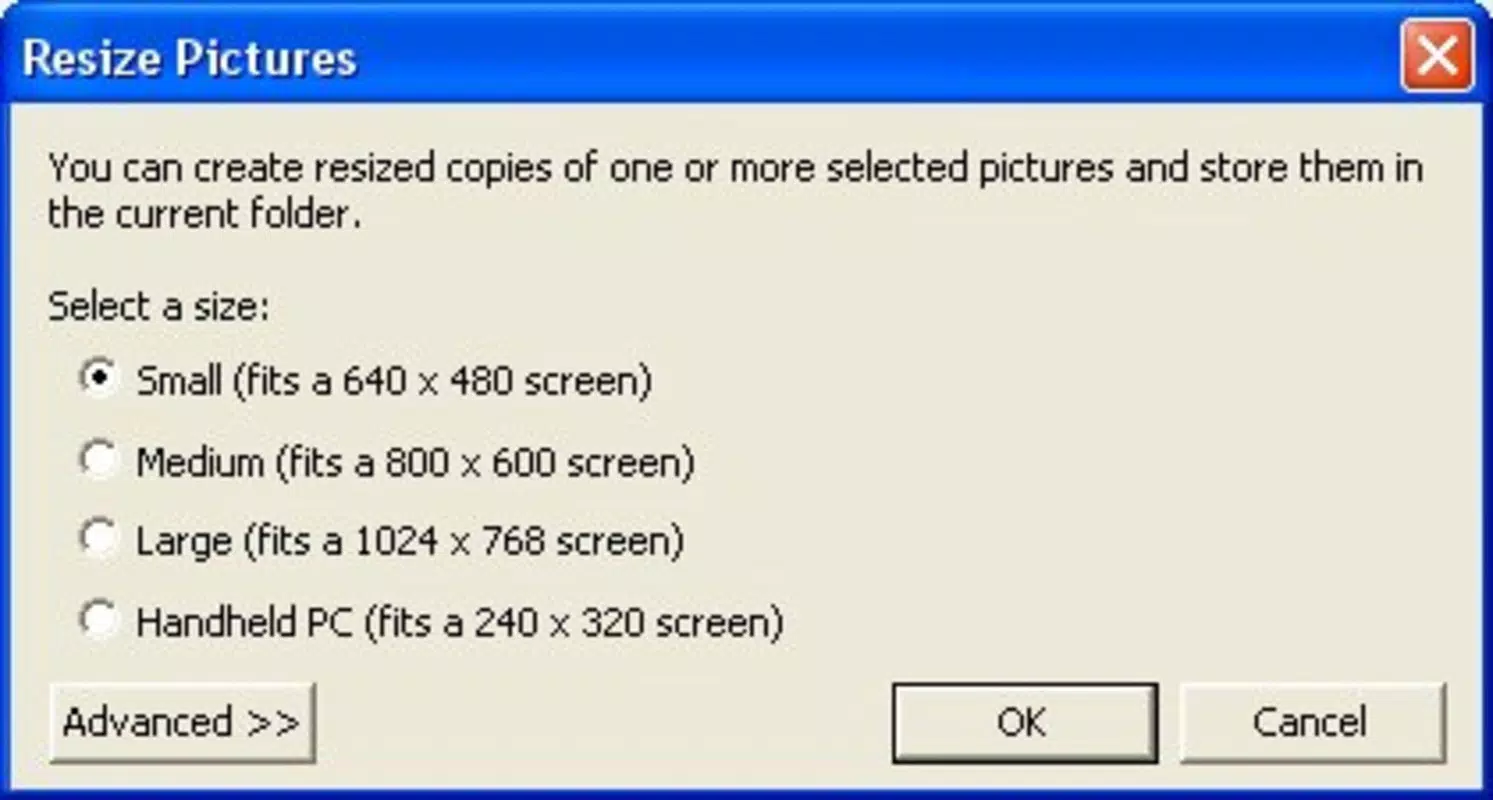
- Four Preset Sizes: Predefined dimensions cater to common digital needs such as web display, social media, or print preparation. These presets provide immediate options without requiring manual input, enhancing speed and consistency.
- Custom Size Options: For precise requirements, users can define exact width and height values. This flexibility supports specialized use cases like creating thumbnails, preparing images for specific software platforms, or meeting exact submission guidelines.
- Batch Processing: Multiple images can be resized simultaneously, saving time when working with photo collections. Resized copies are saved in the same folder, maintaining file organization and reducing the risk of misplacement.
- Fast Processing Speed: The tool performs resizing operations rapidly, with results typically appearing within seconds. This efficiency is especially valuable when handling large image sets or working under time constraints.
For example, a user preparing a set of vacation photos for a family email can select all images, choose a preset size, and generate optimized versions in seconds. Similarly, a content creator preparing images for a website can apply consistent dimensions across dozens of files without opening a full-featured editor. The combination of speed, simplicity, and precision makes this tool a practical addition to any Windows XP user’s digital toolkit.
Interface, UX & Performance
The user interface of Microsoft Image Resizer PowerToy is intentionally minimal, reflecting its role as a utility rather than a full-featured editor. The resizing dialog appears as a lightweight pop-up window with clearly labeled fields for preset selection and custom input. Navigation is straightforward: users select a size option, confirm the action, and the tool processes the images in the background.
The design prioritizes clarity and ease of use, ensuring that even users with limited technical experience can operate it confidently. Although the developer did not list formal performance metrics, the tool’s responsiveness is evident in its rapid execution and low system resource consumption. It operates efficiently on a range of hardware configurations typical of Windows XP-era devices, including systems with limited RAM and older processors.
The application maintains stability during batch operations, with no reported crashes or data corruption under normal use. Users can expect consistent behavior across different file formats supported by Windows XP. The lack of visual effects or animations contributes to its lightweight nature, further enhancing performance.
While modern devices may not face the same constraints, the tool remains functional and reliable on its target platform. Its seamless integration into the file system ensures that users can focus on their tasks without distraction.
Platform Compatibility & Technical Requirements
Microsoft Image Resizer PowerToy is designed for the Windows operating system, specifically targeting Windows XP. The application has a file size of 1.3 MB, making it highly portable and easy to install on systems with limited storage. The software version is 1.0, indicating a stable release with no known updates or newer versions available.
The developer did not specify minimum OS requirements beyond Windows XP, nor were any hardware specifications listed. Compatibility information was not fully disclosed, so users should ensure their system meets the baseline requirements of Windows XP to avoid installation issues. The tool does not require administrative privileges for standard operation, which enhances accessibility for users with restricted account permissions.
While the app is free to download and use, it is not available on modern app stores or through current distribution channels. As such, users seeking to install it today may need to source it from legacy software repositories. The absence of a mobile or cross-platform version means the tool is strictly desktop-focused and limited to the Windows environment.
Pros and Cons
Pros
- Lightweight and fast, consuming minimal system resources.
- Simple right-click integration with Windows Explorer.
- Supports both preset and custom image dimensions.
- Enables batch resizing for multiple files at once.
- Free to download and use with no hidden costs.
Cons
- Only compatible with Windows XP, limiting usability on modern systems.
- Does not support advanced image editing features like cropping or color correction.
- Outdated interface design may feel unfamiliar to newer users.
- Limited to desktop use; no mobile or cross-platform availability.
- Not available through official app stores or modern update channels.
FAQ
Is Microsoft Image Resizer PowerToy safe to download?
The tool is developed by Microsoft and distributed as a free utility. However, since it is not available through official modern channels, users should obtain it from trusted legacy software sources to avoid potential risks.
Can I use this tool on Windows 10 or later?
Microsoft Image Resizer PowerToy was designed for Windows XP and may not function properly on newer versions of Windows. Compatibility is not guaranteed due to changes in the operating system architecture.
Does the tool modify the original images?
No, the tool creates resized copies in the same folder as the original files. The original images remain unchanged, preserving data integrity.
Are there any updates available for this tool?
The current version is 1.0, and no updates have been released since its initial launch in 2006. The developer did not provide information about future updates.
Can I resize images to any dimension using this tool?
Yes, in addition to the four preset sizes, users can enter custom width and height values for precise control over image dimensions.
Final Thoughts
Microsoft Image Resizer PowerToy remains a testament to efficient, focused software design. Though developed over a decade ago, its core functionality continues to serve users who need a reliable, no-frills solution for image resizing on Windows XP. Its simplicity, speed, and integration with the file system make it a valuable tool for anyone managing digital images without the need for complex software.
While its compatibility is limited to older systems, it still holds relevance in niche environments where legacy software is required. For users still operating on Windows XP or maintaining archival workflows, this utility offers a secure, free, and effective way to handle image scaling. Its straightforward interface and batch processing capabilities ensure that productivity is not compromised by technical complexity.
Despite its age, the tool demonstrates that a well-executed utility can remain useful long after its release. Download Microsoft Image Resizer PowerToy now to streamline your image management tasks on Windows XP.


